Usage Statistics
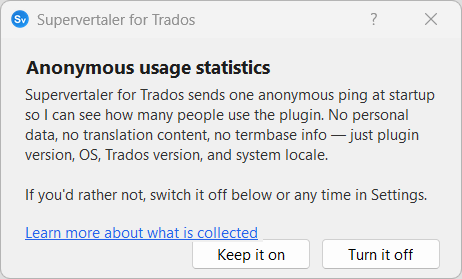
Supervertaler for Trados sends one anonymous, lightweight ping to the developer at startup so he can see how many people are using the plugin and what environments they are running it on. The dialogue below appears once after install or update, and the feature can be switched off at any time.
How it works
- Default-on, opt-out – on first launch after install or update, an informational dialogue (shown above) tells you exactly what is collected and gives you a one-click Turn it off button. You don’t have to do anything to keep it enabled – the dialogue’s default action (the bold Keep it on button, Enter, Esc, or the X-close) all keep it enabled. Your choice is remembered, and the dialogue isn’t shown again.
- Minimal data – a single lightweight ping is sent once per session on plugin startup. The only data included is:
- A random anonymous ID (a UUID generated locally on your machine – not tied to any account, machine, or identity)
- Plugin version (e.g. 4.19.108)
- OS version (e.g. Windows 11)
- Trados Studio version
- System locale (e.g. en-GB)
- Country detection – the hosting provider (Cloudflare) determines your country from the network connection. No IP addresses are stored.
- Silent failure – if the ping fails (no internet, firewall, etc.), nothing happens. No retries, no queuing, no error messages.
- First-party only – data is sent to a Supervertaler-operated Cloudflare Worker endpoint. No third-party trackers, no Google Analytics, no advertising platforms.
What is NOT collected
- No translation content
- No termbase data
- No file names or project names
- No personal information (name, email, etc.)
- No information about which features you use or how often
- No API keys or credentials
Changing your preference
You can change your choice at any time:
- Open Settings (click the gear icon in the Supervertaler Assistant panel)
- In the TermLens tab, scroll to the Privacy section
- Check or uncheck “Share anonymous usage statistics (no personal data)”
- Click OK
The change takes effect on the next Trados Studio session.
Why this exists
As a solo developer, usage statistics provide invaluable insight into:
- How many people are actually using the plugin
- Which Trados Studio versions to prioritise for testing and compatibility
- Which OS versions and locales are most common
- Whether users run Trados on a Mac (via Parallels) or natively on Windows
This information directly informs development priorities and compatibility testing.
Transparency
The full source code for both the plugin-side statistics and the server-side endpoint is publicly available:
- Plugin code:
Core/UsageStatistics.cson GitHub - Server code: The Cloudflare Worker that receives the pings is also open source
You can verify exactly what data is sent by inspecting the code yourself.